
Partition Assistant Main Window - Partition Assistant Help
Partition Assistant works with a main interface, with menu bar, tool bar, disk panel, sidebar and partition list. The main interface includes the number of disks, partition info, like drive letter, label, file system, status and free space, which indicates the related information of the selected disk partition with a specific image

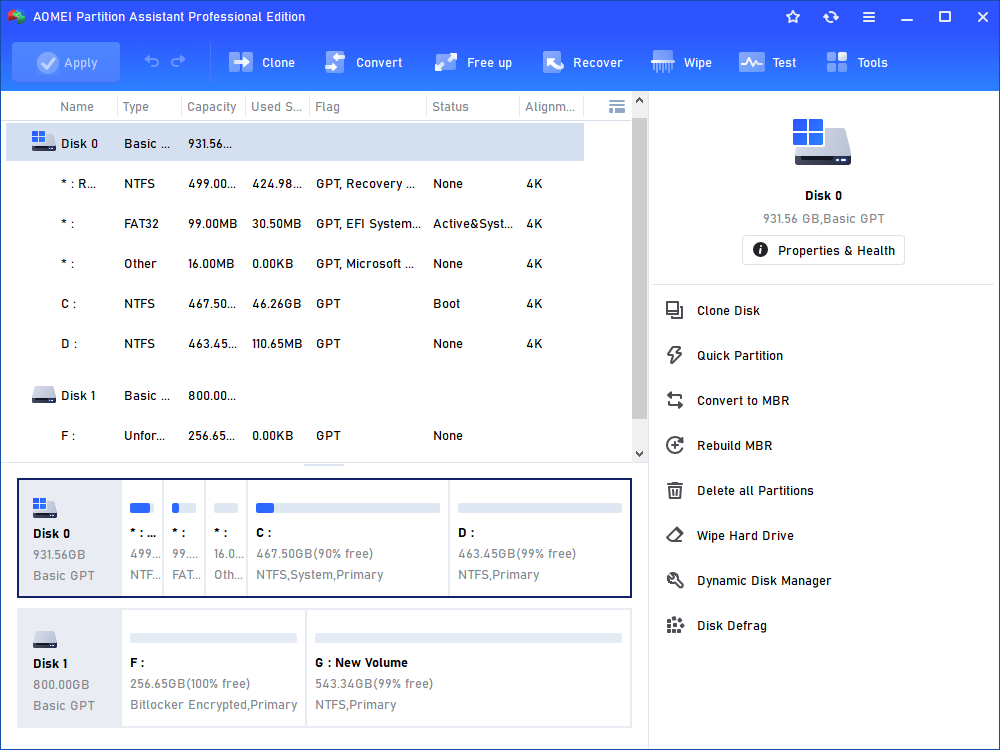
Partition Assistant works with a main interface, with menu bar, tool bar, disk panel, sidebar and partition list. The main interface includes the number of disks, partition info, like drive letter, label, file system, status and free space, which indicates the related information of the selected disk partition with a specific image. You can right click the menu or sidebar to select the partition operations. In addition, some option availabilities (e.g. submenu) will be dependent on your choices. If you need to refresh the interface, just press F5 to reload the device, with a screen shot as bellow:
Related Links
 Before repartition what you need to do?How to use the Extend Partition Wizard to extend a partition?How to use the Partition Assistant to resize a partition? Before repartition what you need to do?How to use the Extend Partition Wizard to extend a partition?How to use the Partition Assistant to resize a partition? |