
How to Wipe Data on Hard Drive and SSD Permanently?
Wiping data on a hard drive or solid-state drive is essential to protect data from stealing. AOMEI Partition Assistant provides wiping ways to erase a drive and ensure wiped data cannot be recovered by any data recovery solution.

Need to wipe data on hard drive or SSD?
"I need to sell my old Samsung SSD but i need to wipe it completely, i'm wondering if formatting can erase data completely without recovery? please advise!"
"Hey guys i bought a laptop that I have to return, but I want to first wipe the hard drive and reinstall windows. What would be the best program to do this? I know there is a lot of options but which would be best."
From the user stories above, we can know that many users need to wipe data from HDD or SSD for different reasons. Some simple operations, like formatting disk partition are not safe enough because the data just becomes invisible to operating system, not removed forever. If you don’t want your personal data to be exposed to anyone else, you need to completely wipe all data from the target disk.
Data wipe software - AOMEI Partition Assistant
To completely wipe a hard drive and ensure no one can recover them in any methods, you can use a powerful hard drive manager-AOMEI Partition Assistant Professional. It is a partition manager designed for Windows operating systems, such as Windows 11, Windows 10, Windows 7, and Windows 8, and so on.
It provides a feature named "Wipe Hard Drive". This feature enables you to overwrite a hard drive with 4 wiping methods: zero-filling, filling sectors with random data, DOD wipe, and Gutmann. Besides, due to different ways of storing, this wiping way is usually not applied to erase an SSD, and has negative affect on lifespan of an SSD.
Therefore, AOMEI Partition Assistant also offers another option: SSD Secure Erase. It is specially for solid-state drive, which allows you to erase all data on a SSD without decreasing its lifespan.
How to wipe data on hard drive in Windows 11,10, 8, 7?
Before you do
- Download and install AOMEI Partition Assistant on a Windows computer.
- Connect the drive you want to wipe to your computer.
-
This feature will erase a given hard drive to anti-recovery. Backup data which you don't want to wipe from the disk you are going to erase in advance.
-
A disk will become blank as soon as it is wiped. After he operation, you can make full use of this disk by re-partition it.
-
If you indeed need to wipe the current system hard drive, you will be askd to restart into Windows PE or PreOS mode, or you can make a bootable device and do the clean in Windows PE mode.
Steps to wipe data on hard drive completely
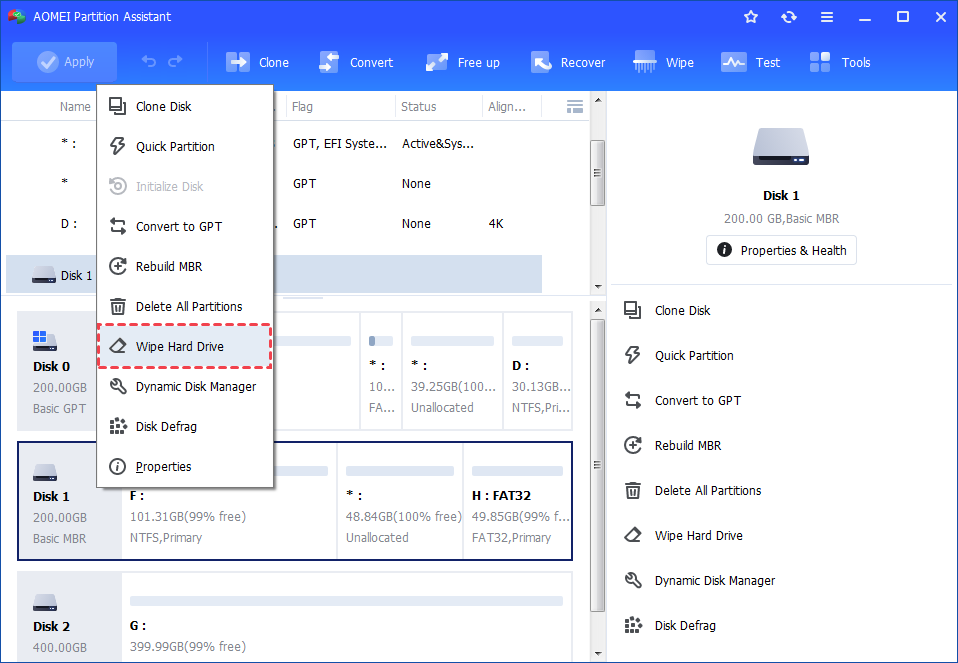
1. Load Partition Assistant and select a hard drive you want to wipe. Right-click the drive and choose "Wipe Hard Drive" option.
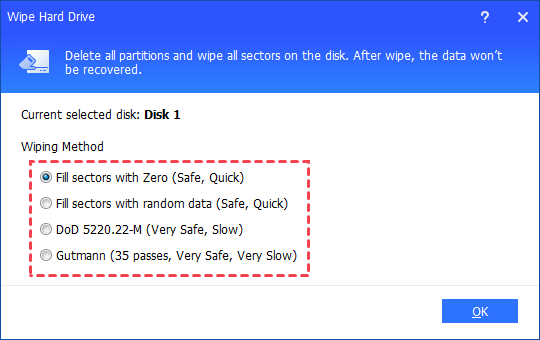
2. Choose a wiping method to wipe the selected hard drive according to your requirements and click "OK".
Notes:
- Fill sectors with Zeros: Overwrite all sectors with zeros. It is common to wipe a personal hard drive. It is safe and fast.
- Fill sectos with random data: It overwrites hard drive with random data. It is more secure than the first one.
- DoD 5220.22-M: DoD standard is firstly pubilished in Department of Defense of the U.S. It is much secure than "zero-filling" and "random data filling" and faster than the Guttman. Thus it is often adopted by companies and organizations.
- Gutmann: It overwrites a hard drive with 35 passes. It is the safest way here, but it also takes the longest time.
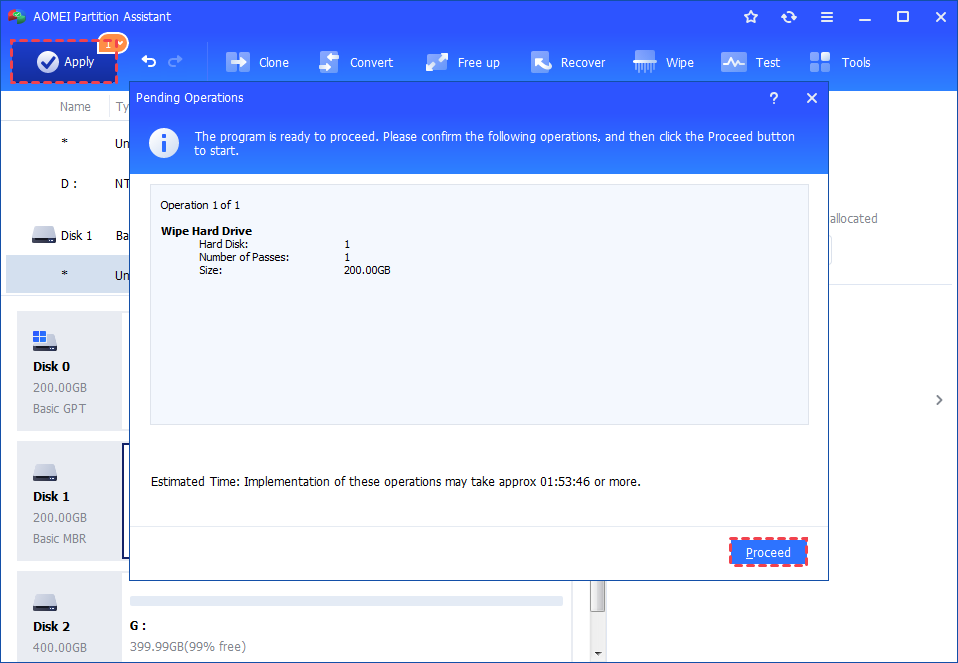
3. You can preview the shrink operation by viewing the "Pending Operations". To commit the "Pending Operations", please click "Apply" and "Proceed".
How to secure erase SSD in Windows 7?
As we know, SSD has different reading and writing ways to traditional hard drive, which makes its wipe-out measures different. AOMEI Partition Assistant is also an Samsung SSD secure erase utility that helps you to clear data completely on a solid-state drive in Windows 7 PC. So If you are working with other Windows system, you need to connect it to a Windows 7 based computer with SATA. Here are the steps below:
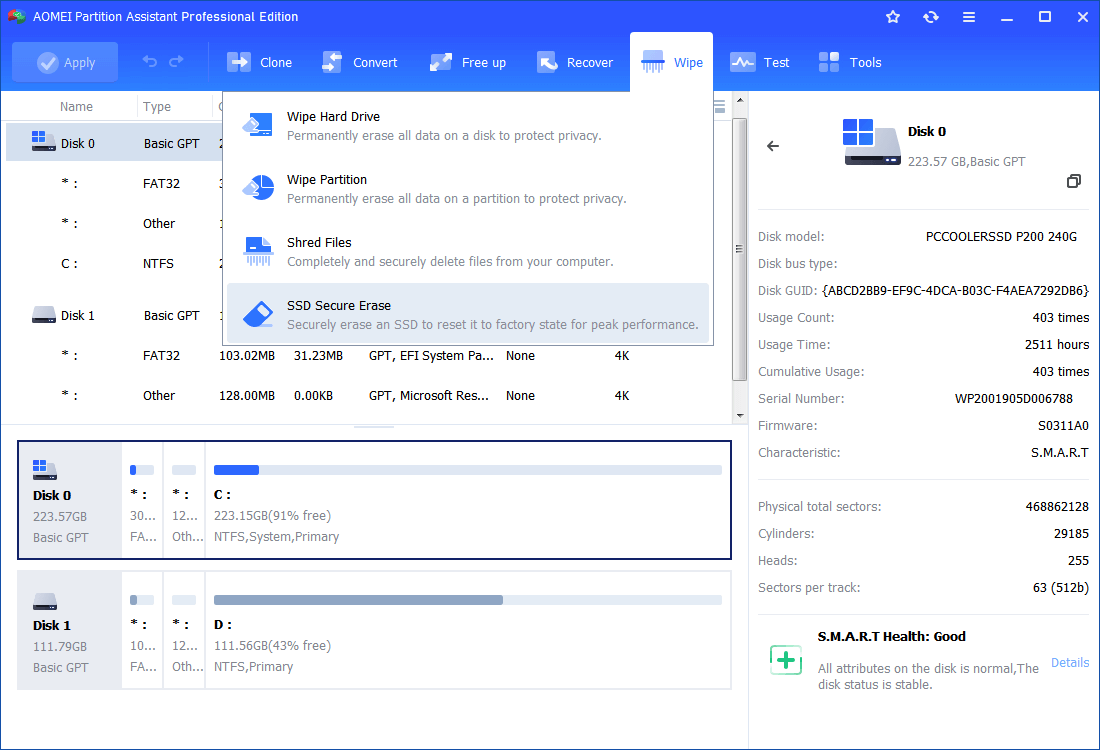
1. Connect the SSD to a Windows 7 computer and make sure it is recognized by Windows 7. Open AOMEI Partition Assistant, click the SSD drive, then click "Wipe" and "SSD Secure Erase".
2. Choose the SSD you'll erase from the list. Double-click the SSD will display its specific information.
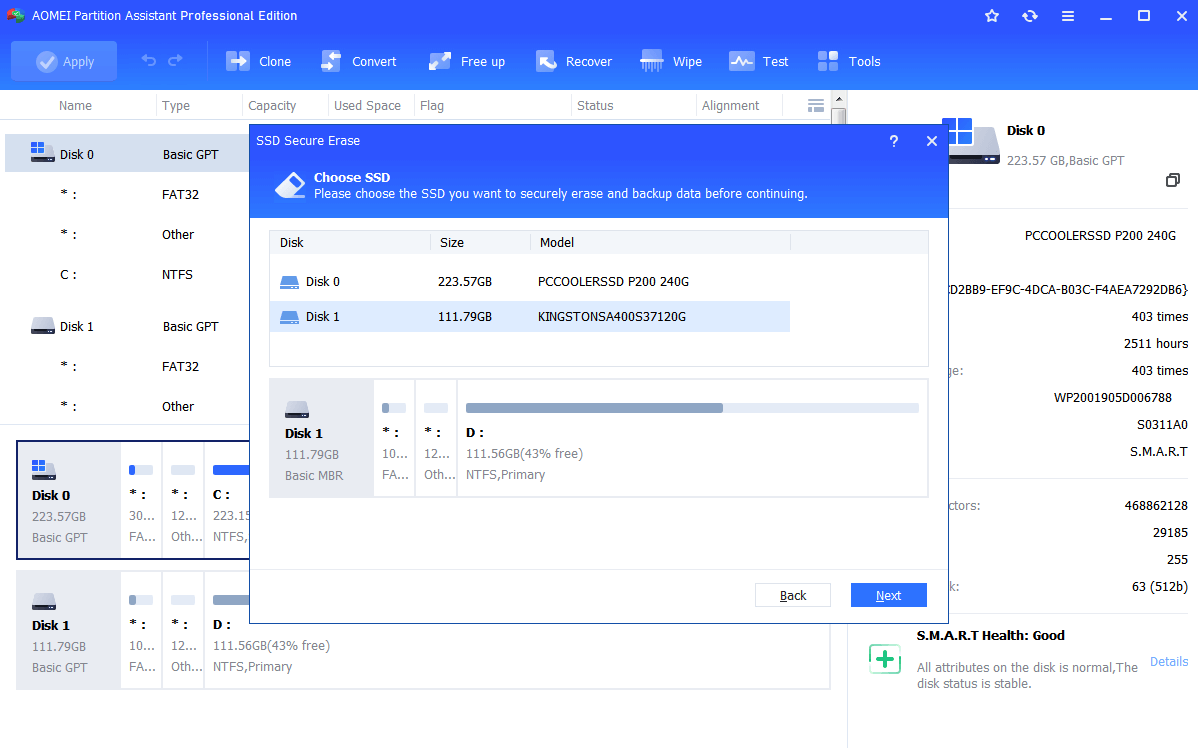
3. At the "SSD identification information" page, you may find the SSD is in a frozen state which set to ensure no one can modify your drive settings. Perform a hot swap to release this restriction.
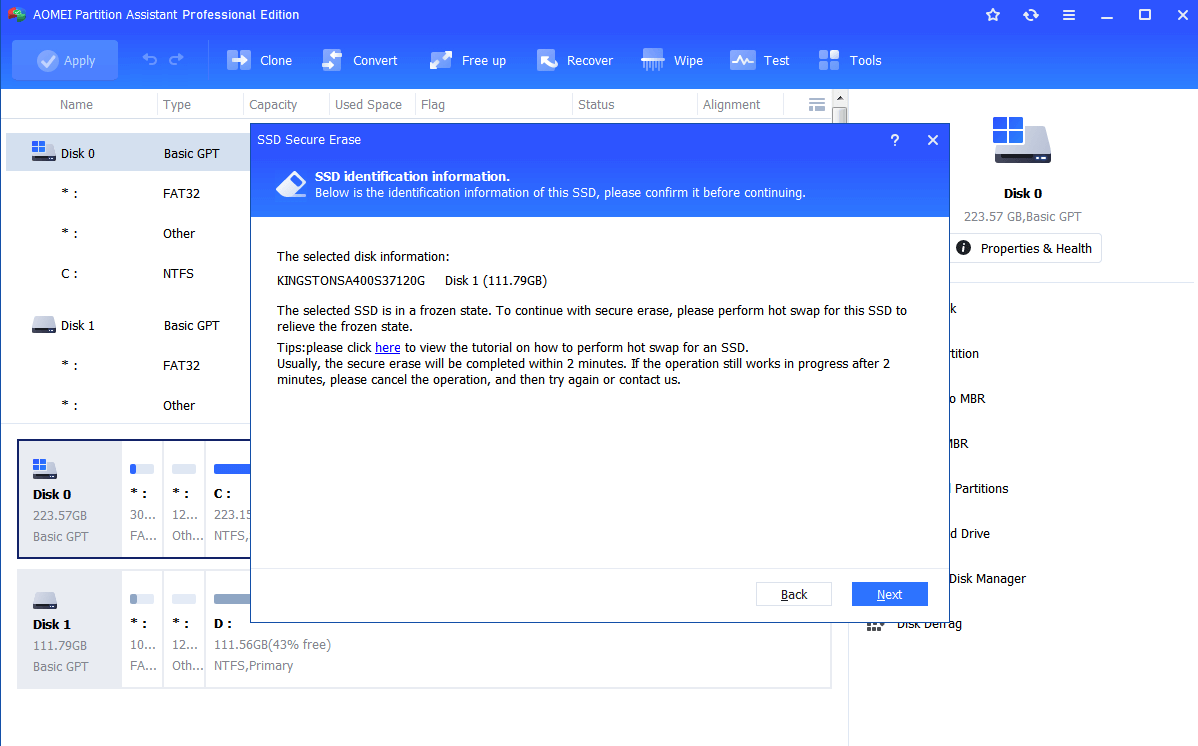
How to perform a Hot Swap?
-
First, open computer case, rear cover or drive shell and find out the SSD you'll erase.
-
Second, unplug the power cable and then disconnect the SATA data cable from SSD.
-
Finally, after a few seconds, reconnect the SATA cable to the SATA port and then plug the power cable back to complete the hot-swap.
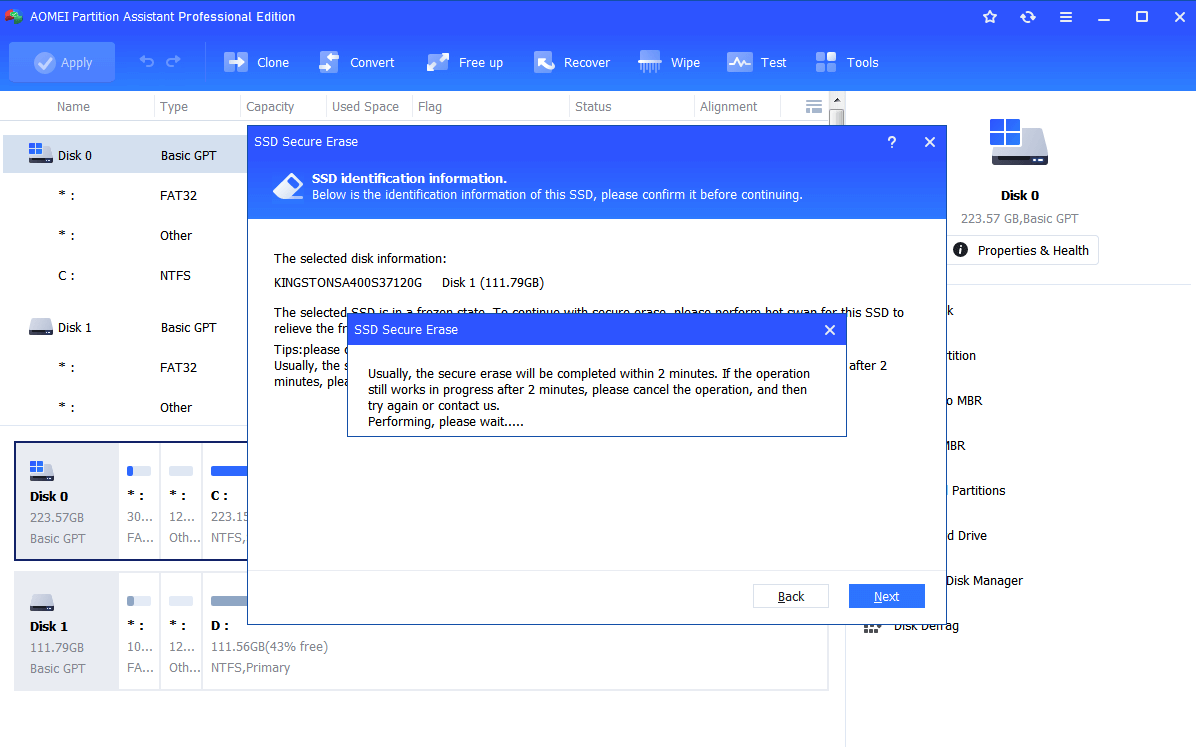
4. Now, click "Next" to start wipe all data on SSD drive completely. Mostly, the erasing process will be done in a short time.
Conclusion
Following the above steps, you can easily and quickly wipe data on a HDD or SSD. This feature is mainly used to erase all data on a hard drive or SSD, which will completely erase all data on a disk or partition without recovery. In this way, it is essential for you to protect your data from being leaked.
No matter what type of disk you want to wipe data on, AOMEI Partition Assistant does a great job in clearing data on hard drive and SSD disk. Apart from wiping data on these disks, it also provides "Quick Partition" feature for user to multi-partition hard drive or SSD in one click.
Notes:
-
Once the wipe operation is carried out by AOMEI Partition Assistant, the data will not be recovered by any data recovery software, so use with caution.
-
AOMEI Partition Assistant is not a file-level wipe software but a sector-level one. So, you can only use AOMEI Partition Assistant to wipe partition/disk. After a partition/disk has been wiped, all the files on it will be erased simultaneously. If you do need to wipe a specific file, you have to download a file-level wipe software.
FAQs:
Q: How long will it take to wipe a hard drive?
A: The time to wipe a drive depends on many factors, for example, the wiping method you select, drive condition, amount of data, and so on.
Q: Is it still possible to recover data after the drive or partition is wiped?
A: It will be unable to recover if the drive or partition has been wiped. Data has been erased and it is unable to recover. Please make a backup in advance if there are important files/folders on the drive or partition.