
Reliable and comprehensive Windows Server partition manager and disk performance optimizer
Automatic renewal. Free get all updates during your subscription period.
One-time payment. Lifetime free upgrades to any later new versions.
This powerful and reliable Windows Server partition manager integrates a set of functions allowing you to rapidly manage hard drives, change disk properties, repair disk errors while ensuring data security.
System C drive in low disk space warning? Or want to resize Server partition? Partition Assistant allows you to resize/move partition or BitLocker-encrypted partition flexibly, delete partition to free up space, split partition to divide a partition into two or more partitions, and merge partitions to enlarge a partition with multiple small partitions, thus optimizing their storage capacity efficaciously.


Flexibly and safely extend and shrink partition space without experiencing any limitations or constraints, even on BitLocker-encrypted partitions.

Directly move spare space from one partition to another. Completely eliminates the problem of sufficient disk space but insufficient C drive capacity.

Step by step wizard to extend a partition by taking free space from other partitions on the same disk without rebooting.

Resize, move, extend, and shrink dynamic disk volumes, including simple, spanned, striped, mirrored, and RAID-5 volumes.

Combine two existing partitions into one to fix unbalanced partition space, and make it easy to manage them.
Partition Assistant Server enables the seamless conversion of MBR to GPT, or vice versa, without any loss of data, effectively resolving problems extra-large hard drive not showing full capacity, or the presence of the "GPT Protective" shield. Dynamic conversion feature allows users to convert disk types from dynamic to basic or basic to dynamic, all while retaining their critical data. Additionally, the NTFS/FAT32 conversion, and primary/logical partition conversion also running without losing data.

Convert MBR to GPT or GPT to MBR without losing data - solves problems such as 3 TB hard drive not showing full capacity, “GPT Protective”, or prepare for Windows 11 upgrade.

Convert disk type from dynamic to basic or basic to dynamic without data loss.

Total data-safe NTFS/FAT32 file system conversion for guard your data closely.

convert primary partition to logical or logical to primary partition without losing data.
Need to upgrade system disk or change a new disk for better performance? With “Migrate OS to SSD/HDD” and “Clone Disk/Partition” features, users can easily transfer all data including system files from the source disk to the target disk. The hot clone won’t disturb your current work, and “SSD 4K alignment” optimization guarantees superior disk performance post-cloning for your Windows Server, enhancing overall efficiency. What’s more, Windows To Go Creator can make a portable system USB to run your Windows on any PC.


Exclusively enables the migration of an OS to another disk, eliminating the cumbersome process of PC setup.

Create a complete duplicate of the original disk. Immediately set up new PC with familiar OS environment. Two cloning methods adapt disks with different storage size.

The most convenient selection for single partition backup needs.
Run your own Windows Server anytime and anywhere on any computer, even a Mac PC.
To free up storage space, the 3 powerful features can effectively transfer installed apps, large folders and remove all unnecessary files, including temporary files, unwanted applications, and system junk. Additionally, the software provides flexible options for customizing your cleaning preferences, allowing you to exclude specific file types or folders from the cleaning process. You can optimize your storage capacity, speed up your system performance, and ensure that your PC always runs at peak efficiency.

Relocating installed programs and large folders to release your system drive from low space crisis. Without reinstalling and resetting, no program data will be damaged, all runs smoothly as before.

Intelligently scan disks and folders automatically, crucial files will be marked, completely eliminate any risk of inadvertently deleting critical files

After full scanning all storage part on computer, any redundant files will be cleaned to keep your device running at its best with no downtime.
Data safety is important for your business. Whether it's data loss or data breach, both can potentially lead to business disruptions. Data recovery helps you to get lost or deleted data back, and data wipe ensures your sensitive data cannot be recovered.

Recover over 200 types of data, regardless of how it was lost - may it be inadvertent deletion, disk formatting, system crash, virus attack, or other issues.

Fast search helps you quickly recover deleted or lost partition. Full search will scan each sector of the selected disk for recovery.

The ultimate solution to completely prevent deleted files from being recovered. Any target files won’t be recovered after 4 shredding methods.

Wipe your hard drive or partition completely and overwriting useless information to prevent data leaking.

Create a USB as a handy repair media to fix issues and save crucial data when devices can’t boot normally.

Reset and remove local account password if you forget it or it’s unavailable.

Automatically clear data fragments on the target disk to keep efficient disk performance.

Let you fix BCD errors without complex command lines.

Test disks speed to monitor devices status.

Thoroughly and meticulously test sectors on the selected disk for filtering all suspicious problems.

Monitor your disk status every day to protect your disks from unexpected failing during daily working.

Easily access and manage UEFI boot entries in Windows.
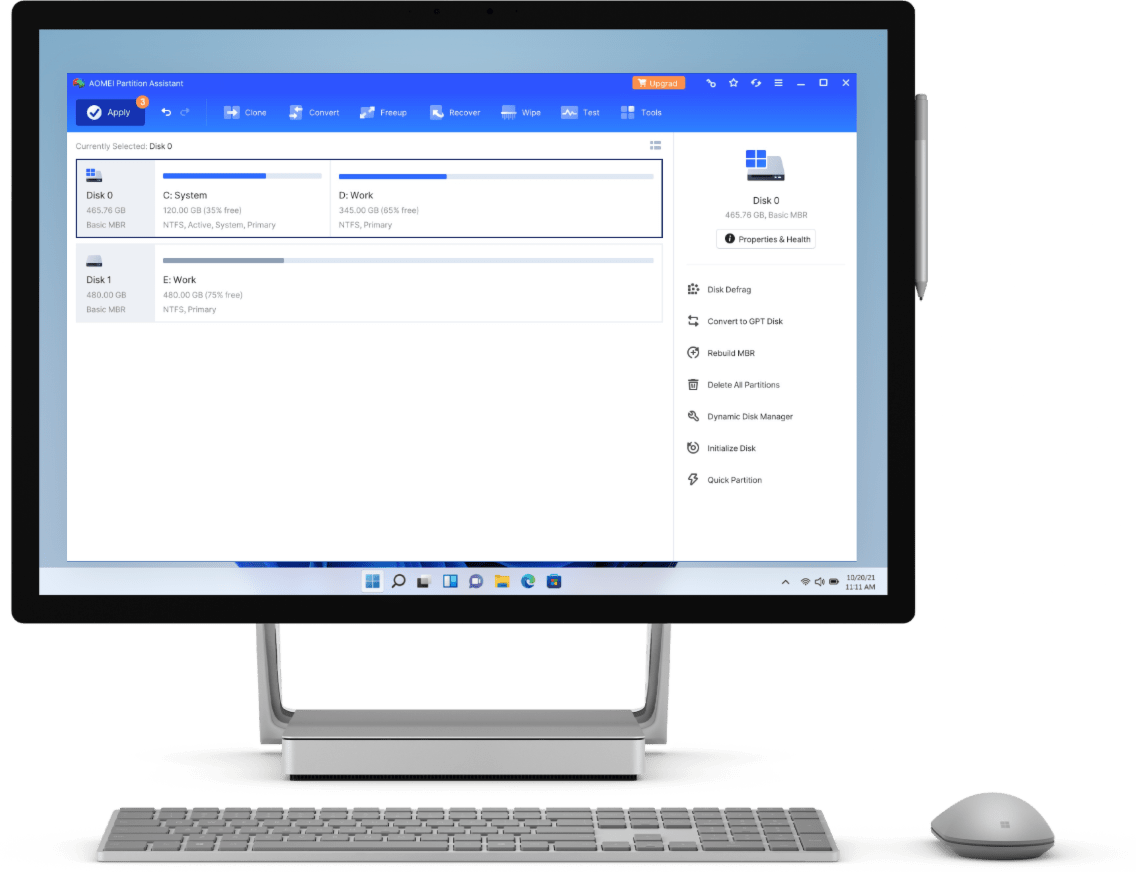

Ease-to-use and intuitive interface makes complicated operations simple and quick. Even a computer beginner can handle it.

Enhanced technologies ensure no data loss. Preview outcome of an operation before you click “Apply” in case operative error.

As the leading provider of disk management solutions, AOMEI Partition Assistant has earned the trust of 60+ millions of users worldwide.
With AOMEI Partition Assistant, you don’t need to delete a partition and you will not lose you data.
It will keep your data to complete partition style conversion. And it works well in convert both Server OS and data partitions.
Windows DM requires adjacent unallocated space to extend a partition, otherwise the option will be greyed out. Fortunately, “Move Partition” feature can work it out, and “Extend Partition Wizard” can directly increase it with free space.
The “Partition Recovery Wizard” can help you. It will scan through your hard drive and recover deleted or lost partition.
Lots of factors can cause system crash. If it is due to bad sectors and BCD error, you can create a bootable WinPE media to boot up your Server, and try check the bad sectors and rebuild MBR to fix it.
AOMEI Partition Assistant supports clone larger disk to smaller SSD as long as the destination drive has enough space to keep the data to clone. And it can be directly placed on the disk bay to boot up your Server.
The Server version is a great assistant for enterprises to get disks in well-managed.
Partition Assistant Server is a fantastic tool that quickly and easily solved our IT department's problem. This post only scratches the surface of the utility's capabilities.
AOMEI Partition Assistant Server would seem to be the most and capable Server partition utility we've tried. It's highly recommended for all Server users.
Great UI and powerful features. It simplifies disk managing work in Windows Server and make people can practice complicated operations with ease.
AOMEI Partition Assistant Server is powerful and feature-rich disk partition management application. It provides lots of functions that could solve troubles and help users to manage storage space
It is the best server partition manager ever, and it is really powerful than I thought. I made a Windows To Go bootable USB to run Windows 8 when I’m in traveling work and helps me a lots.
“Extend system wizard” is a fantastic feature. The low space system drive made me mad but the Windows 2008 can’t help me to change the size at all. And I searched the method and found AOMEI Partition Assistant Server, and it left me deep impression for its interface and solved it problem within a few clicks.
I basically gave up on trying to switch my HDD to GPT SSD without formatting it. I downloaded AOMEI partition assistant and it switched it in seconds without deleting all my stuff! I love it! Thanks.