
How to Extend Partition without Data Loss via Extend Partition Wizard
You can extend your partition with Extend Partition Wizard safely and fastly.

Overview of extend partition wizard
Extend Partition Wizard is a built-in feature in AOMEI Partition Assistant that allows you to extend one partition using the free space on the other partition. It is an easy-to-follow wizard.
You may get a "low disk space" warning when your disk space is insufficient, but Windows Disk Management cannot extend the partition directly. In this situation, you'll need a 3rd-party program like AOMEI Partition Assistant to accomplish this.
You can extend your partition with Extend Partition Wizard safely and fastly.
How to extend partitions with Extend Partition Wizard?
Before you do
- Download and install AOMEI Partition Assistant on a Windows computer.
- Make sure the drive on which you want to extend partitions is an MBR disk because the wizard does not support GPT disks.
- To extend the partition, there must be another partition with free space on the drive.
This tool is very safe and useful for you to extend partitions on a hard drive. If you would like to use this feature, please upgrade to a paid version of AOMEI Partition Assistant Professional, Server, or above versions.
How to extend partitions step by step
Here we take "Extend system partition" as an example.
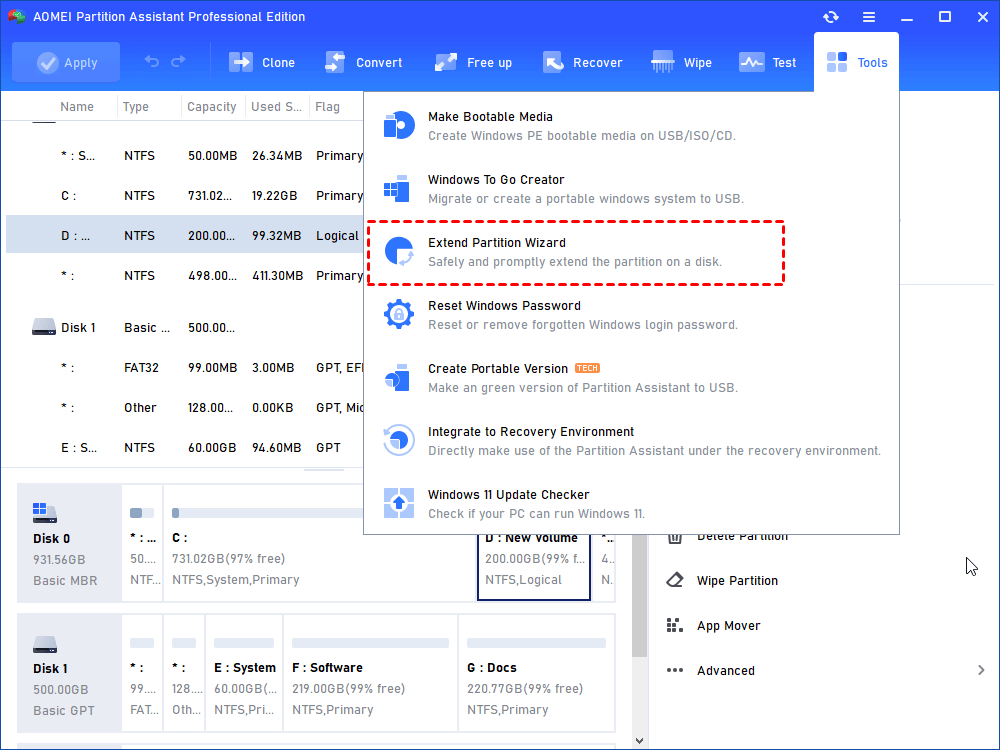
1. Launch AOMEI Partition Assistant, click the "Tools" main tab and select "Extend Partition Wizard".
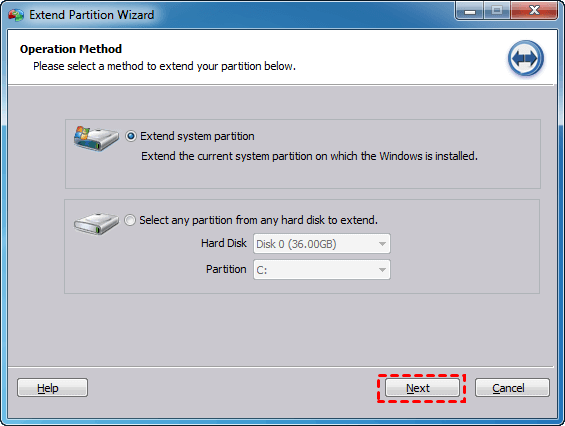
2. Choose the first option "Extend system partition" and click "Next".
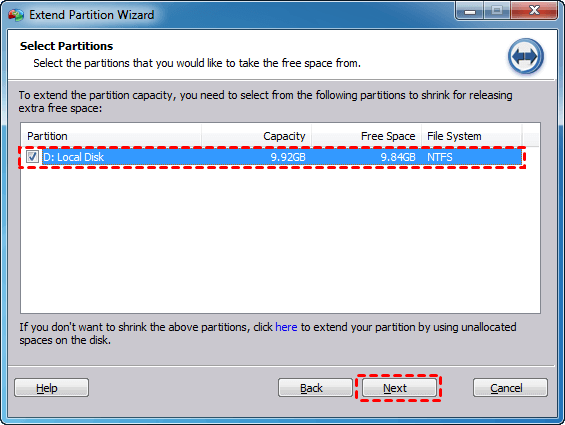
3. Choose the partition that you want to allocate free space from (here we take D drive for example) and click "Next".
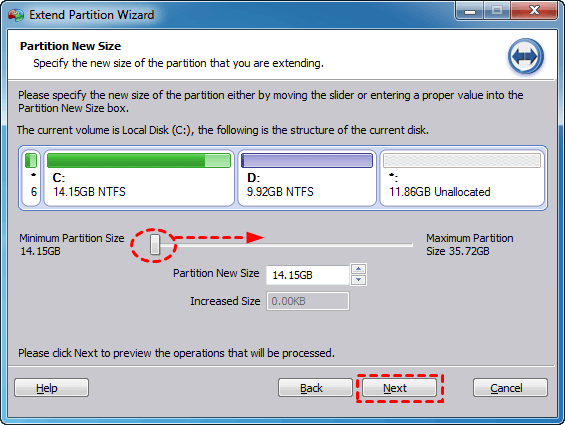
4. Move the slide bar to enlarge the partition size of C: drive and then click "Next".
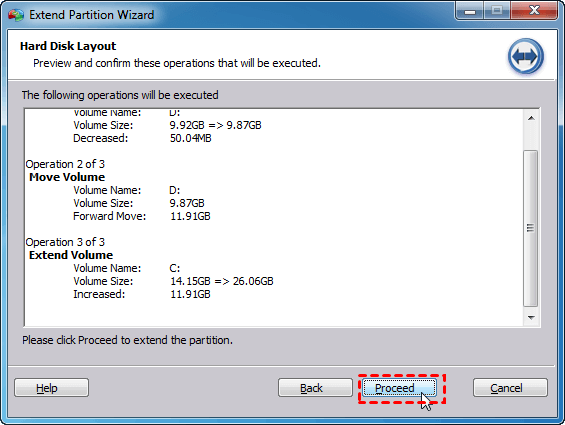
5. Preview the operations that will be executed and click "Proceed".
Conclusion
Following the above steps, you can extend your system partition C: successfully. It is a very safe and useful tool to help you manage your disk space in an easier and faster way.
This wizard is usually used to expand partitions if one partition has run out of space while there is more free space on other partitions. For instance, this feature helps you extend your system partition if your computer gets a message of insufficient space.
Furthermore, Partition Assistant also provides more wizards to help you quickly extend partitions, for example, allocate free space, and resize partition.
Notes:
- Extend Partition Wizard only supports NTFS partitions. If you want to extend a FAT32 partition, you can use Resize/Move Partition feature in AOMEI Partition Assistant.
- If the partition is hidden or doesn't have a drive letter, please assign a drive letter first.
FAQs:
Q: I receive the Error "The wizards only extend a NTFS partition, but detected that your partition isn't a NTFS" when using "Extend Partition Wizard". What does that mean and how can I solve it?
A: "Extend Partition Wizard" does not support any FAT or FAT 32 partitions resizing directly. To solve this problem you need to convert your partition from FAT or FAT 32 to NTFS first by using the command line (convert drive letter: /fs:NTFS) or you can extend the FAT or FAT 32 partition directly on the main console of Partition Assistant.
Q: I get the Error "Sorry, the program doesn't extend this partition yet because of the free disk space is insufficient. We recommend you try to extend the partition in Partition Assistant Main Console".
A: This error always appears when the partition you want to extend was at the end of the hard disk, to solve this problem, you can extend the partition on the main console of Partition Assistant.
Q: I get the Error "The wizard does not support to extend partition on a GPT disk; you can extend the GPT partition by using Partition Assistant Main Console. How could I solve it?
A: Extend Partition Wizard does not support any GPT disk. If you want to resize a partition on GPT disks, you need to resize it on the main interface of Partition Assistant.