
 AOMEI Partition Assistant


Easily Resize Partition on Windows server 2008
Partition Assistant Server Edition helps you freely resize partition windows server 2008 with data untouched.

By Bryce / Updated on May 12, 2023


Windows Server 2008 is widely used within an enterprise, guaranteeing the enterprise's operation and security. Sometimes when boot partition is run out of disk space, the performance of servers will be affected and their operation speed gets decreased. So, we need to optimize disk space usage with a reliable server partition manager.
Resize Partition For Server 2008
As a Server 2008 user, I always think resize partition on windows server 2008 is not an easy task. Because some unreliable software might destroy all the data during the process when resize partition on Windows Server 2008. Now, I have found a fantastic solution – Partition Assistant Server Edition. This professional server partition manager performed all the advanced functions well. It helps me freely resizes Server 2008 with data untouched, even the BitLocker encrypted partition. Aside from resizing function, it also can create, delete, merge, and split partitions, etc.
How to Resize Partition on Windows server 2008
Below is the step-by-step introduction of resizing Server 2008 by this Server 2008 partition manager:
-
Run Partition Assistant Server Edition, showing as bellow, and select partition to resize
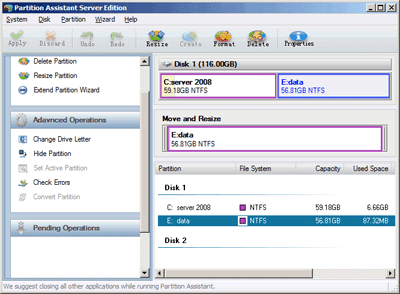
2. Resize partition as you wish, Specify partition size or drag the double-line bar leftward or rightward, then click Ok: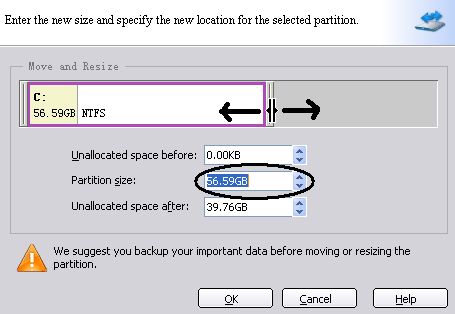
3. Click Apply on the top tool bar to set all the operation effective.

With Partition Assistant Server Edition's help, resize partition Windows server 2008 is easy and convenient. You can also choose unlimited edition or technician edition based on your needs. Try now!