 AOMEI Partition Assistant


Best Free Partition Software for Windows 7, 8, 10 (64 Bit and 32 Bit)
AOMEI Partition Assistant Standard should be the best free Windows 7 64 bit partition software that can partition hard drive safely, like resizing partition without data loss.

By Bryce / Updated on May 12, 2023


Why partitioning hard drive in Windows 7 64 bit?
Usually, there is only one division on hard drive after computer is purchased. Windows 7 64 bit users may need Windows 7 64 bit partition software because they need to partition hard drive out of following causes:
☞ To manage programs and files more conveniently: It is bothering to find out different data when all data are on same part. At this time, partitioning hard drive into more volumes can help users locate various programs and files easier and faster.
☞ To save user’s time and energy: If there are more partitions on the hard drive and some important data shall be backed up, computer users just need the exact partition, rather than the whole disk.
☞ For important data and information safety: As time goes, something is wrong with system and it needs to be restored. All the data will be formatted when computer users restore system, as these data are stored on same partition with system. Thus, it is necessary to partition hard drive for important data and information storage.
☞ For dual boot system: Different operating systems own diverse functions and advantages. Some computer users need to own dual operating systems to meet their demands. Users can own dual boot systems through partitioning hard drive into different divisions; one partition for one system.
Why need third-party partition software for Windows 7 64 bit?
For all above mentioned, it is necessary to partition hard drive. Then, how can you implement hard drive partition? The very first method occurs to you is Disk Management. Let’s have a look at the process of creating new partition with Disk Management in Windows 7 64 bit. First of all, open Disk Management; right click hard drive, select “Shrink Volume” and enter the amount of space to shrink the disk. Then you will gain an unallocated space after finishing shrink; right-click the unallocated space and choose “New Simple Volume”. Then follow instructions as the interface shows to create a new partition.
It seems that disk management can perform the task perfectly. Nevertheless, it still has some defects. It is unable to move partition and the option of “Extend Volume” is invalid when hard drive has no unallocated just behind the partition. Therefore, it is rather necessary to seek out great third party partition software to manage partition better in windows 7 64 bit.
Best free partition software for Windows 7 64 bit and 32 bit: AOMEI Partition Assistant Standard
Nowadays, there is a number of third party Windows 7 64 bit partition software that can help users partition hard drive and AOMEI Partition Assistant Standard is the best free partition software for Windows 7. It is comprehensive and easy-to-use Windows 7 hard drive partition software that offers more functions than disk management. It can be applied to move/resize BitLocker partition, merge and create partition without formatting or reinstalling system and implement other complicated tasks based on disk partition in Windows 7 64 bit and 32 bit. This fantastic partition software for Windows 7 is suitable for Windows 8/8.1/10, Windows XP and Windows Vista as well.
How to: Partition hard drive in Windows 7 without data loss
AOMEI Partition Assistant Standard is a great partition manager for Windows PCs. Apart from creating partition in spit that whether there is unallocated space, it can help you to solve many issues, some are listed below:
»»»»»»»»»»»»»»»»»»»»»»»»»»»»»»»»»»»»»»»»»»»»»»»»»»»»»»»»»»»»»»»»»»»»»»»»»»»»»»»»»»»»»»»»»»»»»»»»»»»»»»»»»»»»»»
»»»»»»»»»»»»»»»»»»»»»»»»»»»»»»»»»»»»»»»»»»»»»»»»»»»»»»»»»»»»»»»»»»»»»»»»»»»»»»»»»»»»»»»»»»»»»»»»»»»»»»»»»»»»»»
Why not free download it and have a try?
Then, you can refer to the following specific steps on how to partition a hard drive easily.
Step 1. Install and run this wonderful partition manager for Windows PCs. Right-click the drive that you want to resize and choose Resize/Move Partition.
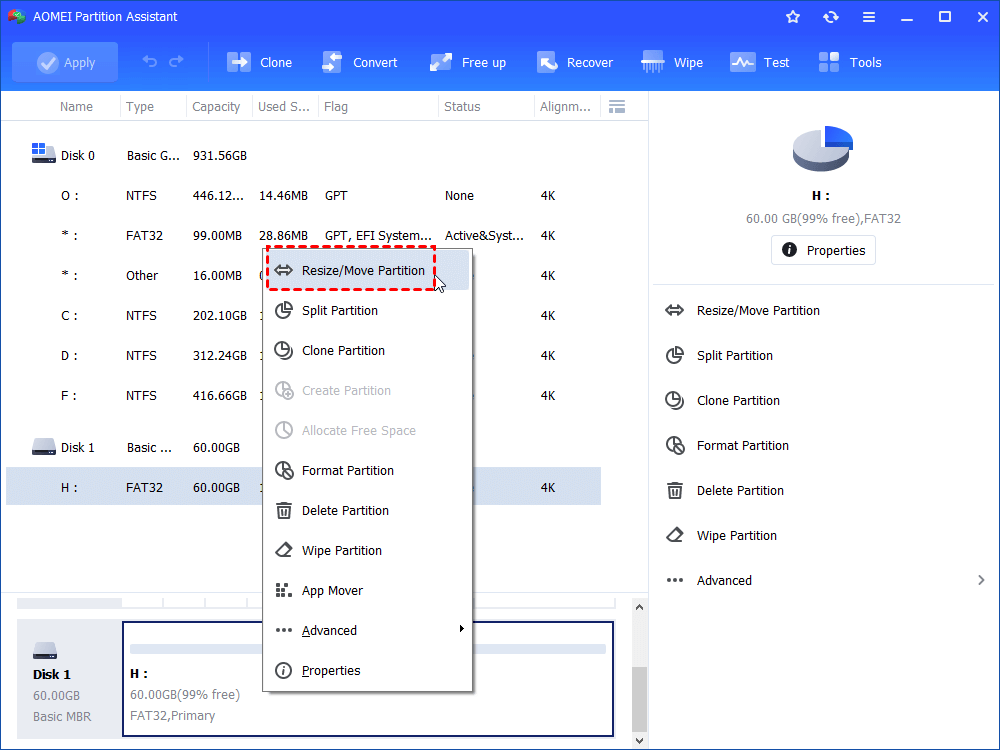
PS.: If there is unallocated disk space on the hard drive, you can begin from Step 3.
Step 2. Move the slider bar to left or right to determine the size of unallocated disk space.
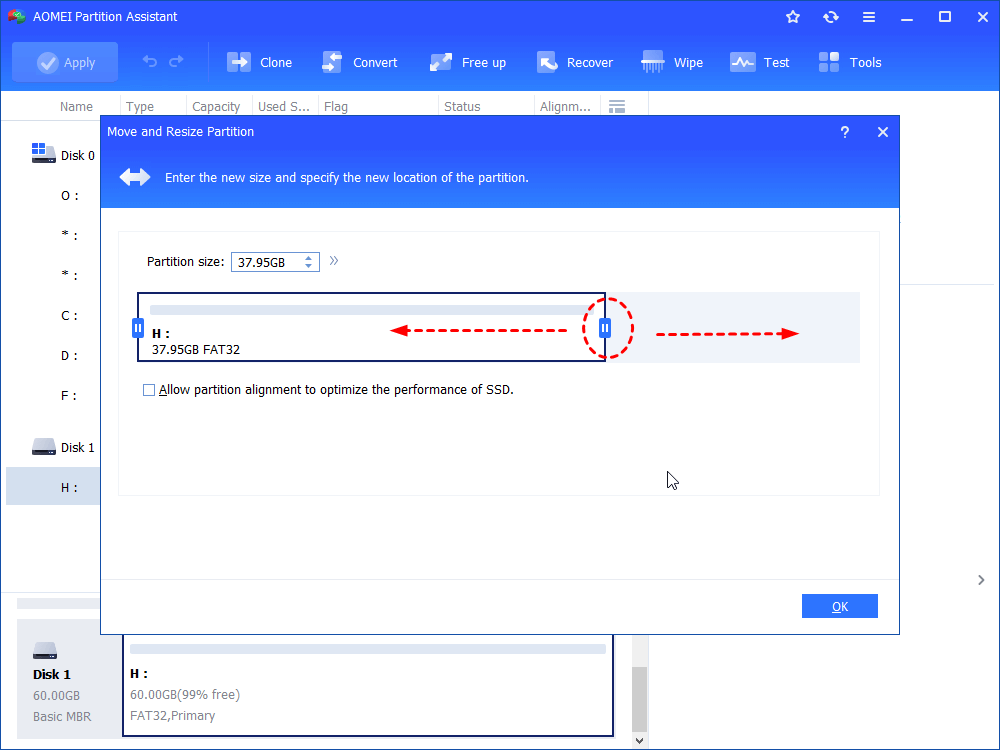
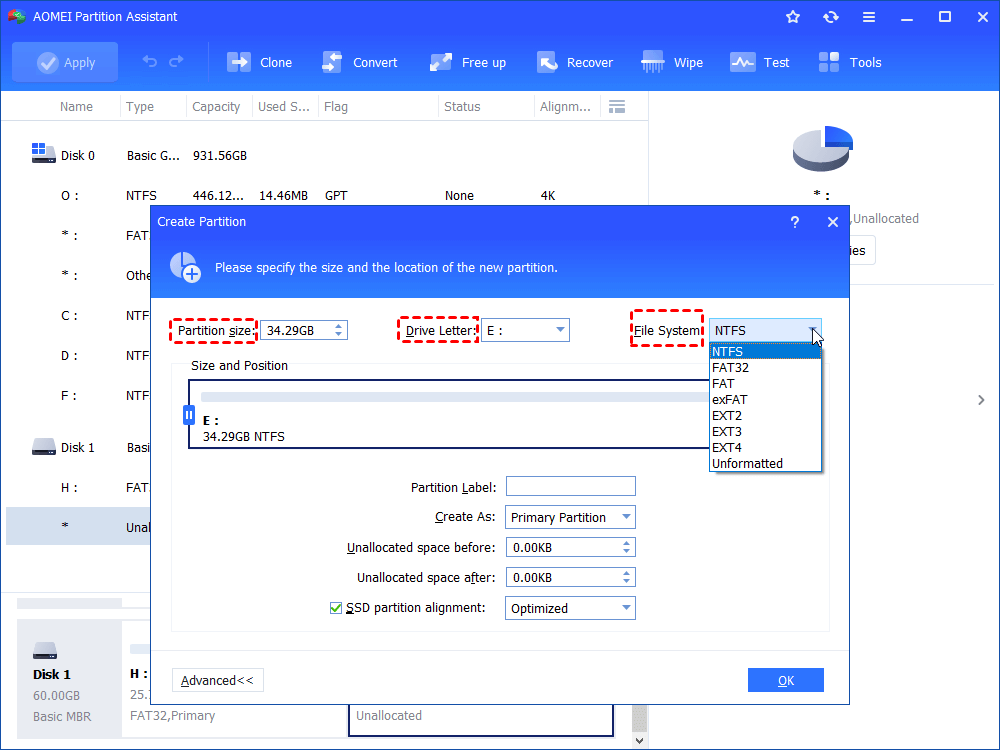
Step 3. There is an unallocated to next to F after finishing the previous step. Right-click the unallocated space and choose Create Partition.
Step 4. The size of the new partition can be changed through moving slider bar or change the number in the box behind “Partition Size” and drive letter and file system are changeable. More Properties can be set through clicking Advanced. Then Click OK after deciding all the above.
Step 5. Click Apply and Proceed to commit the operation.
Conclusion
For all the above mentioned, we can conclude that AOMEI Partition Assistant Standard is an outstanding partition software for Windows 7,8,10 and it can create a partition effortlessly and effectively. If you want to quickly repartition a hard drive or partition a new hard drive, upgrade it to Professional version. The function “Quick Partition” of AOMEI Partition Professional can help users achieve this goal.