As far as we know, file system includes FAT32, FAT16 and NTFS.
FAT32 file systems is back ward with the performance that supports the maximum partition
capacity of 2 TB, and a single file size of 4GB, if we need to store a movie with 10 GB;
it is trouble for us to store separately in multiple little files less than 4GB.
What' more, FAT16 just supports ultimate partition capacity of 4 GB. However,
NTFS seems to be more practical and convenient as unlimited partition volume and its
features and advantages. Somebody wish to convert FAT32 to NTFS as we
need and momentarily. If it has free partition software, why not do it?
Convert to NTFS with AOMEI Partition Assistant
Maybe this method has some trouble for beginner, so how to convert FAT32 to NTFS file system with Free Partition Software-AOMEI Partition Assistant? After downlard this free partition software, please read the following procedure, it is easy.
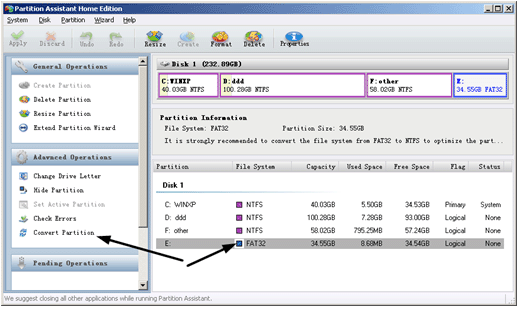
Step one: Run the partition software, let's screenshot that E drive is the file system FAT32 you need to convert, please look at the arrow points to the left, here is "Convert Partition", click it:

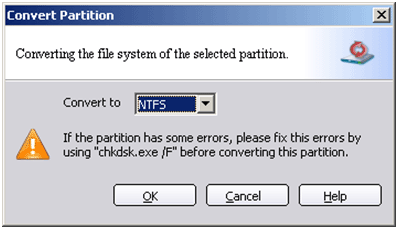
Convert from FAT to NTFS with Partition AssistantStep two: after click "Convert Partition", see this dialog box, click
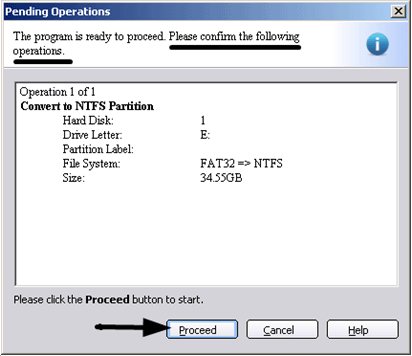
Convert File System DialogStep Three: Please click "Apply" on the toolbar to confirm the operations,then click "Proceed" here:
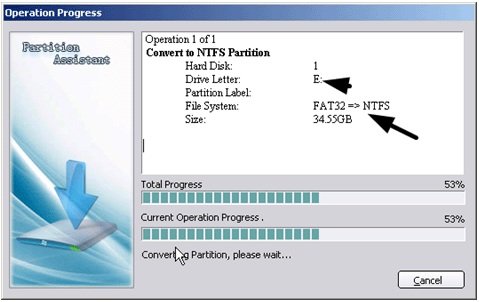
Pending OperationsStep Four: it is the process of operating:
Convert Partition Progress BarAfter you see the FAT or FAT32 partition has been converted to NTFS,
everything is OK now.
More details: The free
partition software, Partition Assistant supports 32/64 bit Windows operating systems
including Windows 2000, XP, Vista and Windows 7,8. It also provides resize, extend,
shrink, and move partition, merge, split partition and so on.
Download FREEWARE AOMEI
Partition Assistant
Convert to NTFS with Convert.exe
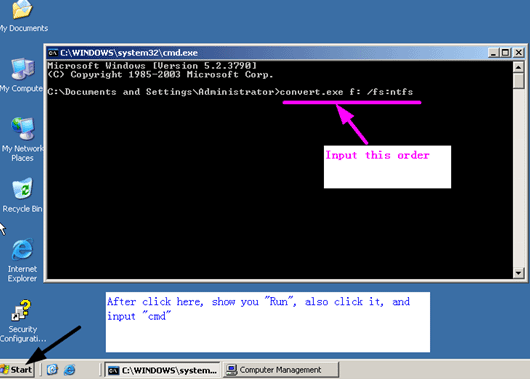
If you are familiar with operating system, Convert.exe command is also a good choice,
here give some directions:
Firstly: click "start" -> "Run", input "cmd"order, OK, come here: look at the arrow,
if want to convert F partition, input the following command:
CONVERT.EXE F: /FS:NTFS
Convert FAT32 to NTFS file
system with CONVERT.EXE Command