 AOMEI Partition Assistant


How to Allocate Free Space from One Partition to Another Easily and Quickly
Do you want to know how to allocate free space to C drive if there is not enough space? Fortunately, you can find a powerful utility to add allocate space easily and safely.

By Bryce / Updated on May 12, 2023


The difference between free space and unallocated space
Free space is a segment of capacity space of a partition which is not in use. It is the rest stored space of a partition. You can use free space to store your data directly; however, unallocated space can’t be used directly. You need to add the unallocated space to an existing partition or create a new partition before you can store data to it. This is the difference between free space and unallocated space.
Why allocate free space to C drive?
"I had my Hard Drive partitioned, however, I did not leave enough memory on my C Drive; how do I take space off my other partition and allocate to my C drive?"
"I have 24 GB on Drive C and 75 GB on Drive E and 70 GB unallocated. How do I move the 70GB unallocated into Drive C thereby increasing the Drive C memory?"
"I have a large C drive, but with time go by, the data on C drive is increasing and I keep getting a low disk space warning when I start my computer. Then the computer operating speed is becoming slower and slower. Is there a way which can help me move the free space from anther partition to C drive to avoid these problems? "
Occasionally, partitions on a hard drive are not rationally partitioned. The system partition is usually given a relatively small portion of space. After installing programs, saving personal files, and upgrading Windows 11/10/8/7, you may see C: drive is running out of disk space. Thus, many computer users might want to allocate free space from other partitions to extend the system partition.
How to get more free space
▶ Disk Management
Windows has a tool called Disk Management which can help you to extend partition. You can press Windows + R key to open Run window and then type “diskmgmt.msc” to open Disk Management in Windows 11/10/8/7. However, the limitation is that there must be unallocated space next to the partition which you want to resize then you can do it.
Usually, there is no unallocated space behind the partition that you want to extend. In that case, you need to delete a partition before you can extend another.
▶ Uninstall unused applications
The majority of users choose to check their programs in order to find out the applications which aren’t used frequently and then uninstall them to gain free space.
▶ Disk Cleanup
Windows has a built-in tool which enables the users to delete the temporary files, system files and other unnecessary data. Previous installation files will be saved on Windows.old folder. You can use this too; Disk Cleanup to delete Windows.old folder. In this way, you can wipe some files to get some free space.
All the methods mentioned above can help you get free space temporally. With time goes, your data will increase again and the same problem will come out again.
How to allocate free space to C drive easily and quickly
As professional and reliable partition software - AOMEI Partition Assistant Professional works flawlessly to allocate free space from one partition to another to make use of disk space reasonably.
In order to allocate free space you should take the following steps: First of all, please download the Demo version to follow this guide. If you prefer the free version, you can use Merge Partition feature to add unallocated space to any partition or merge two contiguous partitions without data loss.
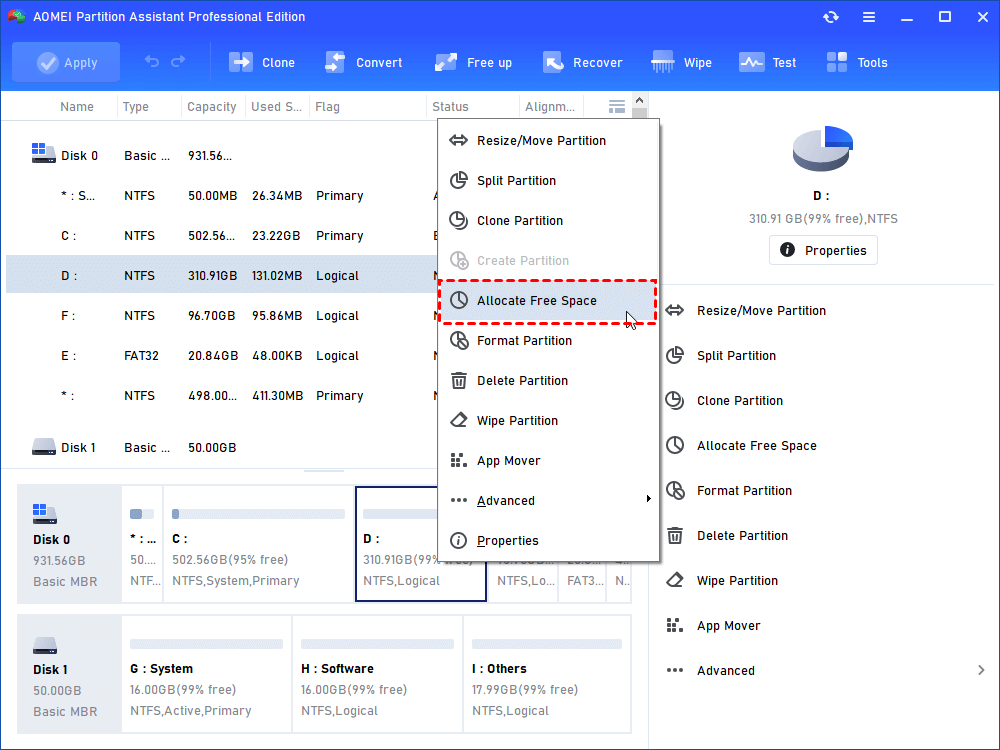
Step1. Launch AOMEI Partition Assistant Professional (PA Pro). The fresh interface displays conditions of the physical disk.
Step2. As we can see from the graphic view, there is enough unused space on D drive, so we’d like to allocate free space from D drive to C drive. Right-click D drive and select "Allocate Free Space".
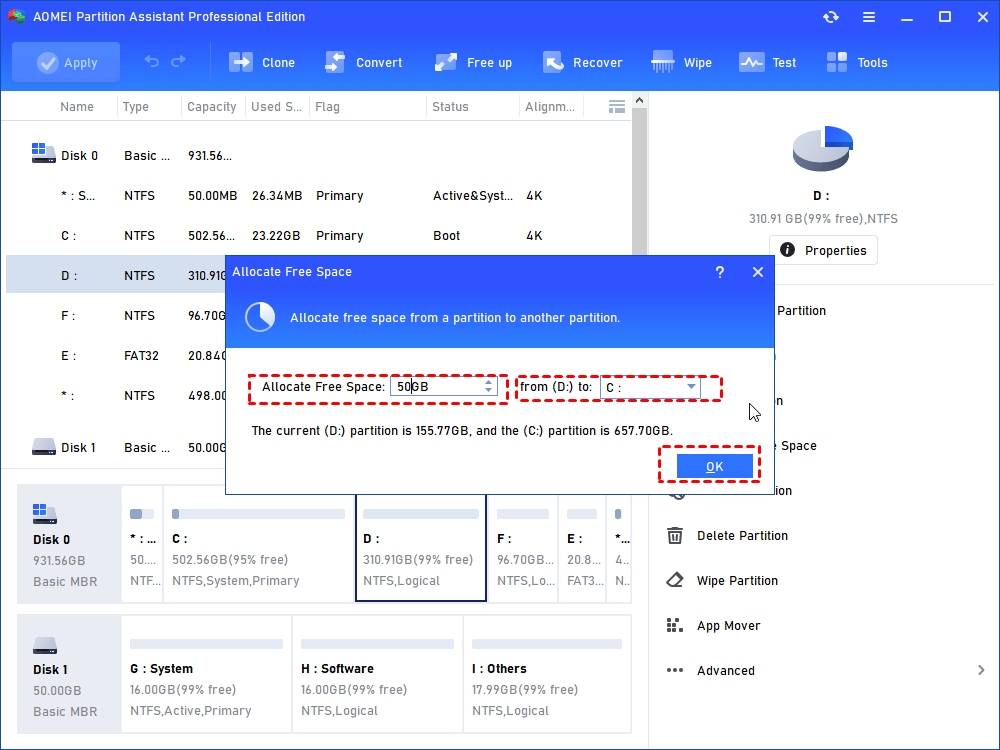
Step3. In the pop-up window, we could specify the free space to be allocated and the destination partition that the free space will be added to.
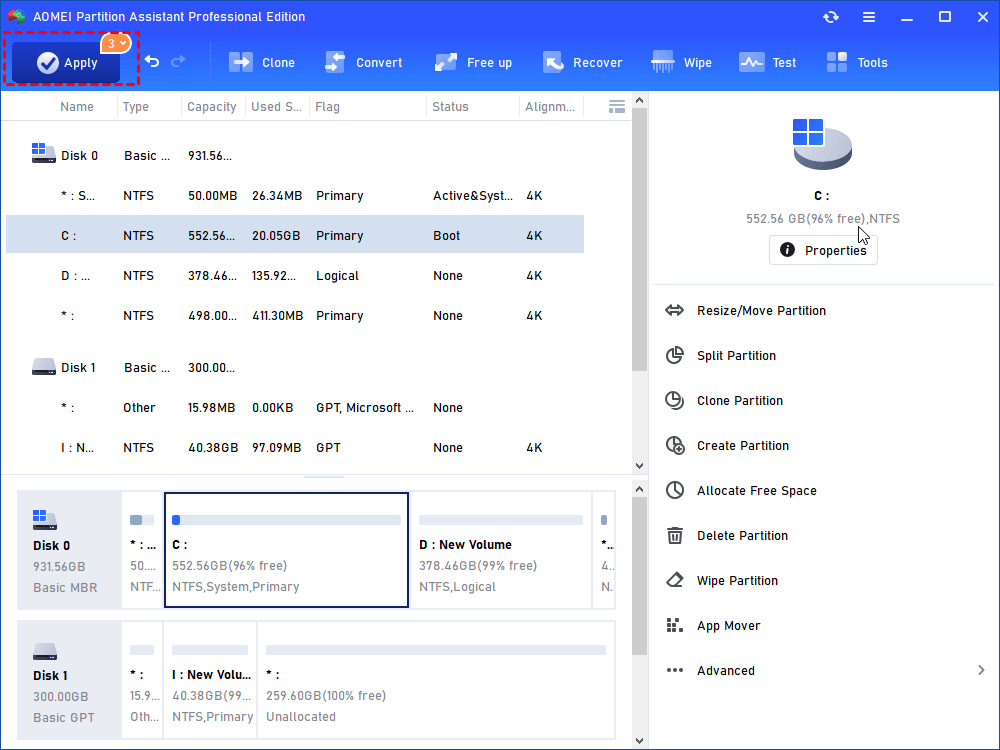
Step4. View "Pending Operations" on the sidebar in case of corrections and then click "Apply" on the toolbar to execute pending operations.
Apart from allocating free space, AOMEI Partition Assistant also helps perform advanced operations like resize/move partition, merge partitions, split partitions, clone disk, copy partition, dynamic disk management and a lot more. In additional, all the features work well with Windows 11, 10, 8, 7, Vista and XP.
Tips:
● Partition manager server tool, AOMEI Partition Assistant Server Edition provides powerful partition management for Windows Server 2000/2003/2008/2012/2016/2019/2022, including R2, both 32 and 64 bit.
● AOMEI Partition Assistant Unlimited Edition and Technician Edition allow unlimited license and usage in one company or several companies, both of them cover all the features on partition management.